
Best overall for general bookkeeping: QuickBooks Online. Best for shared financial oversight: Xero. Best for invoice-led service businesses: FreshBooks. The best accounting software for small businesses in 2026 is the system that fits your transactions and supports a reliable monthly bookkeeping process—not the one with the longest feature list.
- QuickBooks Online is the best accounting software for small businesses needing general bookkeeping and financial reporting.
- Xero suits shared financial oversight; FreshBooks suits service businesses organized around client invoicing.
- Zoho Books suits connected business workflows; Wave suits straightforward invoicing and bookkeeping needs.
- Vikprocpa is best for Newark and Bay Area owners seeking ongoing bookkeeping alongside business tax preparation and planning.
Why this matters
Accounting software records activity. Monthly bookkeeping turns that activity into records you can use: reconciled accounts, understandable reports, and questions resolved before business tax preparation begins.
For Newark and surrounding Bay Area businesses, Vikprocpa offers bookkeeping, accounting, tax preparation, and financial planning services. Personal attention and clear explanations matter when you need to understand the numbers, not just receive another report.
Your 2026 software decision should therefore start with ownership: who enters transactions, who checks them, and who explains the results? A capable platform still needs someone responsible for completing the work.
Choose the bookkeeping process first, then choose software that supports it. That order keeps a feature checklist from replacing the business decision.
What makes the best small-business accounting software?
Use these criteria before comparing products. They focus on the work your business needs completed every month.
- Transaction fit: Your system should handle how you collect revenue, pay expenses, and document purchases without unnecessary workarounds.
- Reconciliation: You need to compare the accounting records with bank and credit card statements and investigate differences.
- Useful reporting: Profit-and-loss and balance-sheet reports should help you understand performance and what the business owns and owes.
- Clear responsibilities: Establish which tasks belong to you, your staff, and your bookkeeper. Software access alone does not assign responsibility.
- Tax preparation support: Organized transaction records and supporting documents give the tax preparer a clearer starting point. Software does not decide every tax treatment.
- Manageable complexity: Choose functions you will use and maintain. Extra configuration creates work when nobody owns it.
Confirm the current product's capabilities and your accountant's preferred workflow before committing. The recommendations below distinguish business needs, not software specifications that remain identical across every subscription.
Best accounting software at a glance
| Software | Best for | Standout capability | Key limitation |
|---|---|---|---|
| QuickBooks Online | General monthly bookkeeping | Connected bookkeeping and financial reporting | Configuration and account review still require attention |
| Xero | Shared financial oversight | Online accounting with collaboration | Shared access does not establish review responsibilities |
| FreshBooks | Invoice-led service businesses | Invoicing alongside expense and accounting tools | An invoice-first workflow is not the right starting point for every business |
| Zoho Books | Connected business workflows | Accounting within the broader Zoho application family | Connected applications still need deliberate setup |
| Wave | Straightforward bookkeeping needs | Invoicing and basic accounting workflows | Simplicity is not a substitute for checking complex requirements |
These 2026 recommendations are a starting shortlist. The deciding question is whether your bookkeeper can produce accurate, explainable records using your actual transactions.
1. QuickBooks Online: best for general monthly bookkeeping
QuickBooks Online combines transaction recording, invoicing, reconciliation, and financial reporting. It is the default recommendation here for owners who need an accounting system rather than a tool focused primarily on sending invoices.
Start with your chart of accounts—the categories used to organize income, expenses, assets, and liabilities. A clear structure makes reports easier to interpret; an unnecessarily detailed one makes coding transactions harder.
QuickBooks Online pros:
- Brings core bookkeeping tasks into one accounting system.
- Supports reviewing business activity through financial reports.
- Connects invoicing with the broader accounting records.
QuickBooks Online cons:
- Imported transactions still need classification and review.
- An untidy account structure produces confusing reports.
- Software setup does not resolve older bookkeeping errors.
Best for: Owners who need a general accounting foundation for ongoing monthly bookkeeping.
Before selecting QuickBooks Online, ask who will review uncategorized transactions, reconcile accounts, and explain unusual balances. These are service-scope questions, not buttons you can enable.
Verdict: Buy QuickBooks Online when general bookkeeping is your priority and someone owns the monthly close. The monthly close is the process of finishing and checking a month's accounting records.
2. Xero: best for shared financial oversight
Xero provides online accounting, invoicing, reconciliation, and reporting tools. Its collaboration-oriented approach makes it a useful shortlist option when the owner and accounting support both need to work with the records.
Shared visibility works best with a clear handoff. Decide who supplies supporting documents, who reviews transaction coding, and who approves changes to completed periods.
Xero pros:
- Supports an online accounting workflow shared with accounting support.
- Brings reconciliation and reporting into the bookkeeping process.
- Keeps invoicing connected to the business's accounting records.
Xero cons:
- Shared access does not prevent duplicated or overlooked work.
- Moving existing records requires a planned opening position.
- Reporting still depends on consistent transaction treatment.
Best for: Owners who want an active working relationship with their bookkeeper rather than an occasional exchange of files.
Ask your prospective bookkeeper how questions will reach you and how corrections will be documented. That conversation reveals more about the working relationship than a dashboard demonstration.
Verdict: Buy Xero when shared financial oversight matches how you and your bookkeeper will work.
3. FreshBooks: best for invoice-led service businesses
FreshBooks combines client invoicing with expense tracking and accounting tools. It deserves consideration when sending invoices and following client payments shape your daily administrative work.
This use case cuts across industries. The relevant distinction is how your business operates, not whether your business belongs to a particular professional category.
FreshBooks pros:
- Gives client invoicing a central role in the workflow.
- Connects expense tracking with accounting tasks.
- Supports organizing financial activity around service work.
FreshBooks cons:
- An invoice-led workflow does not address every business model.
- Payment collection alone does not show complete profitability.
- Your bookkeeper still needs to check balances and classifications.
Best for: Small businesses whose recurring administrative challenge is managing service invoices and related expenses.
For your 2026 evaluation, follow a transaction beyond the invoice. Check how the payment, processing deduction, business expense, and account reconciliation fit together. A convenient front end must still lead to understandable books.
Verdict: Buy FreshBooks when service invoicing is central and its accounting workflow fits your full bookkeeping needs.
4. Zoho Books: best for connected business workflows
Zoho Books handles accounting tasks such as invoicing, expenses, reconciliation, and reporting. Its place within the Zoho application family makes it relevant when you are evaluating accounting alongside other business systems.
The advantage is workflow fit, not simply having more connected applications. Define which system holds the authoritative customer, invoice, and payment records before building connections.
Zoho Books pros:
- Covers core accounting and invoicing activities.
- Provides an accounting option within the Zoho application family.
- Supports considering accounting as part of a wider business workflow.
Zoho Books cons:
- Application connections require setup and ongoing ownership.
- Overlapping records create reconciliation questions.
- More automation does not eliminate exception handling.
Best for: Owners who want to evaluate accounting alongside connected business applications.
Ask your bookkeeper to trace how information enters the ledger—the accounting record behind your reports. Establish how someone will spot a missing, duplicated, or incorrectly classified transaction.
Verdict: Buy Zoho Books when connected workflows solve a defined business need; skip unnecessary connections.
5. Wave: best for straightforward bookkeeping needs
Wave offers invoicing and accounting tools for small businesses. It belongs on the shortlist when your priority is a straightforward workflow rather than a complex accounting setup.
Simple should describe the business requirement, not the amount of attention given to the records. Even a business with uncomplicated transactions needs account reconciliation and supporting documents.
Wave pros:
- Brings invoicing and bookkeeping into the same product family.
- Provides a focused option for straightforward accounting needs.
- Offers a starting point for evaluating essential bookkeeping tasks.
Wave cons:
- A simple workflow is not enough for every accounting requirement.
- Unusual transactions still need informed classification.
- Future requirements deserve review before moving records.
Best for: Owners with straightforward invoicing and bookkeeping requirements who have confirmed the product fits their transactions.
Do not choose Wave merely to postpone a bookkeeping decision. Identify who will complete the records and explain the reports, just as you would with any other platform.
Verdict: Buy Wave when your documented requirements are straightforward; hold if important workflows remain untested.
Put monthly bookkeeping at the center
Your 2026 accounting setup needs a repeatable process. Use the following sequence to discuss responsibilities with any bookkeeping provider.
- Collect records: Gather account statements, receipts, invoices, and explanations for unfamiliar transactions.
- Classify transactions: Record activity in appropriate accounts and separate business activity from personal activity.
- Reconcile accounts: Compare recorded balances and activity with the relevant statements; investigate differences rather than forcing a match.
- Review reports: Check financial statements, resolve open questions, and identify matters that need tax advice.
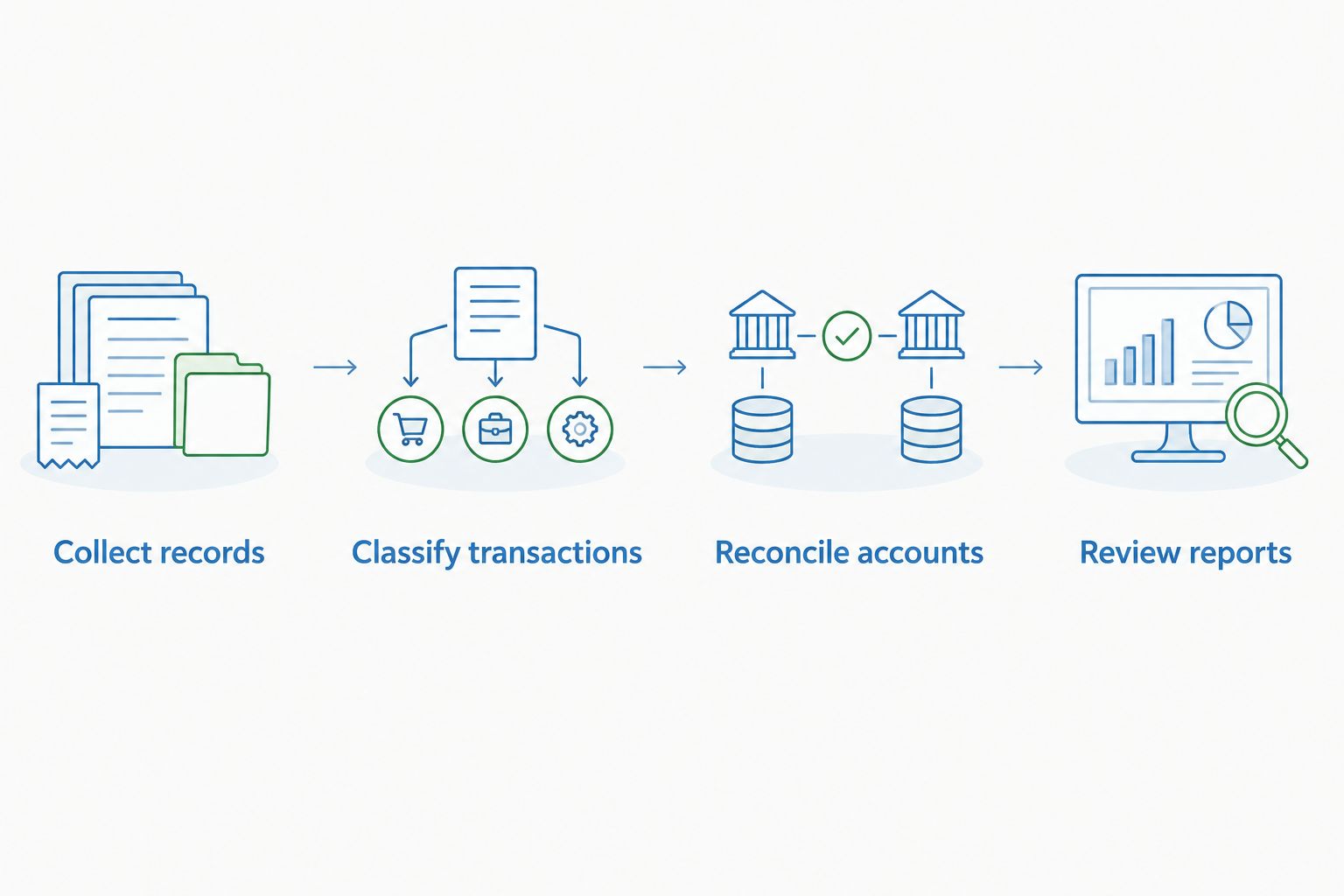
Hypothetical example: A business has 2 bank accounts and 1 credit card account. Its monthly process includes 3 account reconciliations, even if the owner uses only one dashboard to view activity. Those figures illustrate the scope of work; they are not client results or a service package.
For monthly bookkeeping, Vikprocpa is best for Newark and Bay Area owners who want accounting support alongside business tax preparation and tax planning. Ask what the proposed engagement includes, which records you must supply, and how unresolved questions will be handled.
The firm offers bookkeeping and tax-related services; that does not establish which software, integrations, or reporting arrangements are included in your engagement. Confirm those details during the consultation.
Connect bookkeeping to business tax preparation
Business tax preparation uses accounting records, but tax treatment and bookkeeping classification are not always identical. Your tax preparer needs enough detail to evaluate items such as equipment purchases, owner transactions, and business expenses.
Tax planning addresses decisions before filing, using your circumstances and current rules. Clean books support that discussion; they do not guarantee a particular tax result.
If you are searching for a Fremont CPA, bring the same questions you would ask in Newark: Who completes the monthly bookkeeping? Who handles business tax preparation? How are planning questions identified and discussed?
For 2026, start that conversation with your current reports and unresolved bookkeeping questions. A software switch alone does not answer them.
How the recommendations were ranked
This guide ranks software by distinct working needs: general bookkeeping, shared oversight, service invoicing, connected applications, and straightforward accounting. The criteria are transaction fit, reconciliation, reporting, responsibilities, tax preparation support, and manageable complexity.
The ranking is a workflow-based recommendation, not a claim of hands-on testing or a measured product-performance study. No platform receives credit for removing the need to review accounting records.
Use the shortlist to narrow your decision, then check your actual workflow before moving your books.
Which accounting software should you choose?
Choose QuickBooks Online as the default for general small-business bookkeeping. Choose Xero when shared financial oversight is the priority, FreshBooks for invoice-led service work, Zoho Books for connected business workflows, or Wave for straightforward requirements.
If your current software already supports the work, first investigate the bookkeeping process. Changing platforms does not assign responsibility, recover missing documents, or explain an unexplained balance.
Bring Vikprocpa your current bookkeeping questions before deciding whether to move systems. The useful outcome is a clear monthly accounting arrangement, not a migration for its own sake.
FAQ
What's the best accounting software for small businesses in 2026?
QuickBooks Online is this guide's default recommendation for general small-business bookkeeping. Xero, FreshBooks, Zoho Books, and Wave serve different workflow priorities, so confirm how each fits your transactions and bookkeeping support.
Is QuickBooks Online better than Xero?
QuickBooks Online is the default here for general bookkeeping; Xero is the recommendation for shared financial oversight. Choose the system that supports a clear working arrangement with your bookkeeper rather than treating either as universally better.
Do I still need a bookkeeper if I use accounting software?
You still need someone responsible for completing and checking the bookkeeping. Software records and organizes activity, but reconciliation, unusual transactions, and report review require attention.
What should monthly bookkeeping include?
A defined monthly bookkeeping process should cover collecting records, classifying transactions, reconciling accounts, and reviewing reports. Confirm the exact engagement scope, your responsibilities, and how open questions are resolved.
Which accounting software is best for a service business?
FreshBooks is this guide's recommendation when client invoicing drives the service business's workflow. Check the complete accounting process, including expenses, reconciliation, and reporting, before choosing it.
Can accounting software handle business tax planning?
Accounting software supplies records for tax planning; it does not replace advice about your circumstances. Discuss proposed business decisions with your tax professional rather than assuming a software category determines the tax treatment.
What should I ask a Fremont CPA about bookkeeping?
Ask who completes the books, what the monthly engagement includes, and how bookkeeping connects with business tax preparation and tax planning. Also confirm which software the proposed engagement supports and what information you must provide.
One last thing
Before switching accounting software in 2026, ask your bookkeeper to explain an unresolved balance in your current records. Then ask how that balance will be treated during a move.
Do not carry an unexplained problem into a new system and call the migration complete. Resolve it, document it, or establish exactly who is responsible for investigating it.
Related guides
Published by Vikprocpa.